Google Review Request SMS Templates That Get Results (2026)
15+ proven Google review request SMS templates with industry examples, timing tips, and CASL compliance. Copy, paste, and start collecting more reviews today.


Published at:
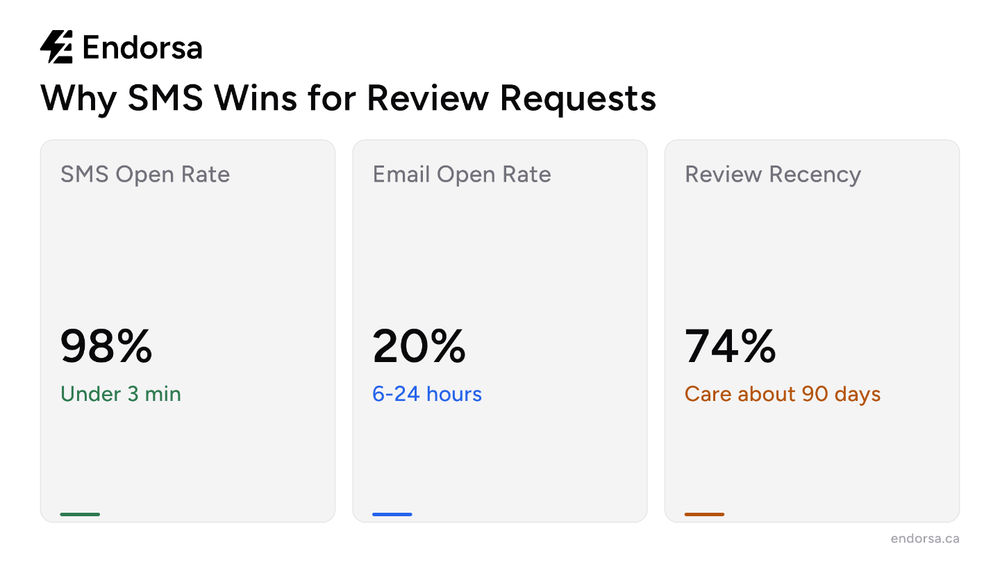
Updated at:Google review request SMS templates are the fastest way to collect more reviews from your customers. Text messages have a 98% open rate compared to 20% for email, making SMS the single most effective channel for review requests in 2026.
This guide gives you 15+ copy-paste SMS templates organized by scenario, plus timing strategies, personalization tips, and compliance rules so every message you send converts into a Google review.
Want to automate your SMS review requests? Sign up for Endorsa today to see how it works.
Why SMS Is the Best Channel for Google Review Requests
SMS outperforms every other review request channel by a wide margin. The numbers tell the story: text messages achieve a 98% open rate with most opened within 3 minutes of delivery. Email review requests, by comparison, average a 20% open rate and often sit unread for hours or days.
Channel | Open Rate | Avg Response Time | Best For |
|---|---|---|---|
SMS | 98% | Under 3 minutes | Post-service, same-day requests |
20% | 6-24 hours | Detailed follow-ups, premium services | |
In-Person | Varies | Immediate | High-touch interactions |
QR Code | Varies | Immediate | Physical locations, signage |
The reason SMS works so well for review requests is timing. According to BrightLocal's consumer review survey, 74% of consumers only care about reviews from the last 90 days. Fresh reviews matter, and SMS captures feedback while the experience is still top of mind.
74% of consumers only consider reviews from the last 90 days, making timely review requests essential for maintaining a fresh review profile.
5 Elements Every SMS Review Request Needs
A high-converting review request text message includes five elements. Miss any one of them and your response rate drops.
Element | Why It Matters | Example |
|---|---|---|
Customer's first name | Personalization increases open rates by 26% | "Hi Sarah" |
Your business name | Reminds them who you are | "from Downtown Dental" |
Specific service reference | Shows you pay attention | "your cleaning appointment today" |
Direct Google review link | Removes friction | "tap here to leave a review: [link]" |
Thank you or appreciation | Ends on a positive note | "Thanks for choosing us!" |
The most common mistake businesses make is sending a generic text that reads like spam. A message that says "Please leave us a review" with no context gets ignored. A message that references the specific service, uses their name, and includes a direct link converts.
If you need help creating your Google review link, we have a step-by-step guide that walks through the process in under 60 seconds.
15+ Google Review Request SMS Templates (Copy and Paste)
These templates are organized by scenario. Copy the one that fits, swap in your business name and the customer's first name, and attach your Google review link.
Post-Service (Same Day)
Template 1: Simple and Direct "Hi [First Name], thanks for visiting [Business Name] today! We'd love to hear about your experience. Tap here to leave a quick Google review: [link]. It takes less than a minute. Thanks!"
Template 2: Service-Specific "Hi [First Name], we hope you're happy with your [service type] today at [Business Name]. Your feedback helps us improve and helps other customers find us. Leave a Google review here: [link]. Thank you!"
Template 3: Warm and Personal "Hey [First Name], it was great seeing you at [Business Name] today. If you have 30 seconds, we'd really appreciate a Google review: [link]. Your words make a big difference for our small business!"
Post-Purchase Follow-Up
Template 4: Next-Day Check-In "Hi [First Name], thanks for your purchase from [Business Name] yesterday! If everything looks good, we'd love a quick Google review: [link]. Your feedback helps us keep doing what we do best."
Template 5: Product Satisfaction "Hi [First Name], how are you enjoying your [product]? If you're happy with it, a Google review would mean the world to us: [link]. Thanks for supporting [Business Name]!"
Relationship Builder (Repeat Customers)
Template 6: Loyal Customer "Hi [First Name], you've been a [Business Name] customer for a while now and we really appreciate your loyalty. If you have a moment, a Google review would help other customers find us: [link]. Thank you!"
Template 7: Milestone Request "Hi [First Name], we just noticed this was your [number] visit to [Business Name]. Thank you for trusting us! If you'd be willing to share your experience on Google, here's the link: [link]. We appreciate it!"
Problem-Resolved Follow-Up
Template 8: After Issue Resolution "Hi [First Name], we're glad we could resolve [issue] for you. Your satisfaction matters to us. If you feel we handled things well, a Google review helps us show other customers what to expect: [link]. Thank you!"
Industry-Specific Templates
Template 9: Restaurant "Hi [First Name], thanks for dining with us at [Restaurant Name] tonight! We hope you loved the [dish/experience]. If you have a moment, a Google review helps other food lovers find us: [link]. See you next time!"
Template 10: Dental Practice "Hi [First Name], thanks for choosing [Practice Name] for your appointment today. We hope it was a positive experience. If you have 30 seconds, a Google review helps other patients find great dental care: [link]."
Template 11: Contractor/Home Services "Hi [First Name], we hope you're happy with the [project type] work at your home. If the job met your expectations, a Google review helps other homeowners find reliable contractors: [link]. Thanks for trusting [Business Name]!"
Template 12: Auto Repair "Hi [First Name], thanks for bringing your [vehicle] to [Shop Name]. We hope everything runs great! If you're satisfied, a Google review helps other drivers find honest mechanics: [link]. Drive safe!"
Template 13: Salon/Spa "Hi [First Name], we hope you're loving your new [service, e.g., haircut/color]! If you're feeling great about the results, a Google review helps others find their perfect stylist: [link]. Thanks for visiting [Salon Name]!"
Template 14: Real Estate "Hi [First Name], congratulations again on [closing/finding your new home]! If you're happy with how things went, a Google review helps other buyers and sellers find the right agent: [link]. Wishing you all the best!"
Follow-Up Reminder (If No Response)
Template 15: Gentle Nudge (Send 3-5 Days After First Request) "Hi [First Name], just a friendly reminder from [Business Name]. If you have a moment, we'd still love to hear about your recent experience: [link]. No pressure at all, and thanks either way!"
Template 16: Final Follow-Up (7-10 Days) "Hi [First Name], last note from us! If your experience at [Business Name] was positive, a Google review helps us grow: [link]. We appreciate your time either way. Have a great week!"
When to Send Your SMS Review Request (Timing by Industry)
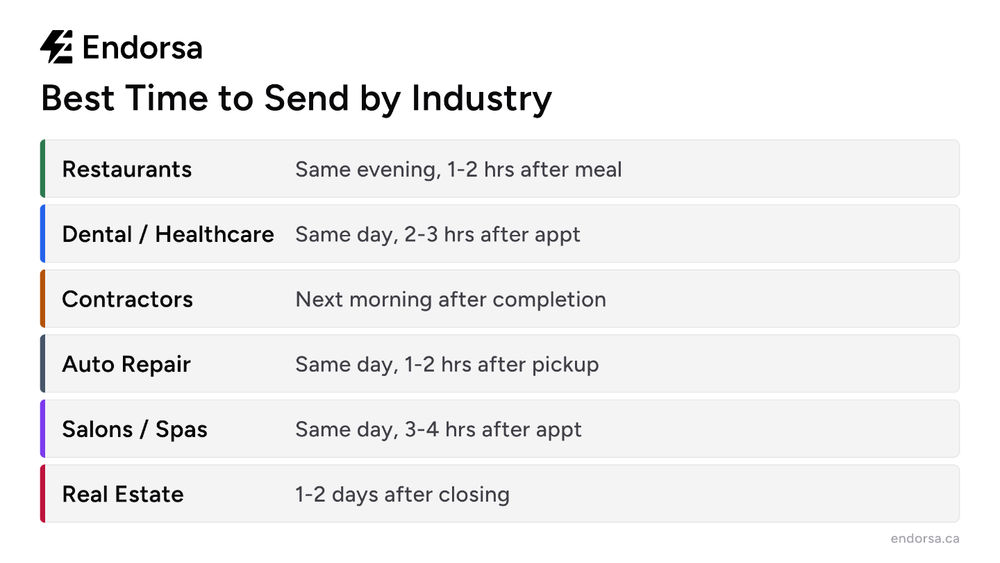
Timing determines whether your review request gets a response or gets ignored. The best time to send depends on your business type, because customer availability and post-service satisfaction windows vary.
Business Type | Best Time to Send | Why This Timing Works |
|---|---|---|
Restaurants | Same evening, 1-2 hours after the meal | Experience is fresh; customers are relaxed |
Dental/Healthcare | Same day, 2-3 hours after appointment | Patient is home and settled |
Contractors | Next morning after project completion | Homeowner has seen the finished work in daylight |
Auto Repair | Same day, 1-2 hours after pickup | Customer has driven the vehicle and verified the repair |
Salons | Same day, 3-4 hours after appointment | Client has seen the results and received compliments |
Real Estate | 1-2 days after closing | Excitement is high; paperwork stress has faded |
According to Whitespark's research on local ranking factors, review velocity (how frequently new reviews come in) accounts for a significant portion of local pack ranking signals. Sending requests consistently, rather than in bursts, builds a steady review cadence that Google rewards.
Businesses that maintain a consistent review cadence of 3-5 new reviews per month see the strongest local search performance.
CASL Compliance for Canadian Businesses
Canadian businesses must follow the Canadian Anti-Spam Legislation (CASL) when sending SMS review requests. CASL applies to all commercial electronic messages, including text messages that promote a business. Violations carry penalties up to $10 million per infraction.
Here is what CASL requires for SMS review requests:
Prior consent: You need express or implied consent before texting a customer. A completed transaction creates implied consent for up to two years.
Business identification: Every message must clearly identify your business name and include contact information.
Unsubscribe mechanism: Include a way for recipients to opt out. A simple "Reply STOP to opt out" satisfies this requirement.
Record keeping: Keep records of when and how you obtained consent.
A CASL-compliant SMS template looks like this:
"Hi [First Name], thanks for choosing [Business Name] today. We'd appreciate a Google review if you have a moment: [link]. Reply STOP to opt out."
This is one area where tools like Endorsa make a real difference. We built CASL compliance directly into our SMS workflows, including automatic opt-out handling, consent tracking, and sender identification, so Canadian businesses can send review requests without worrying about compliance.
5 Common SMS Review Request Mistakes
Most businesses lose potential reviews because of avoidable mistakes in their text messages.
1. No direct review link. Every extra tap a customer needs to find your Google profile is a conversion killer. Include the direct review link in every message. If you don't have one yet, create your Google review link first.
2. Sending at the wrong time. A review request at 11 PM or three weeks after service gets ignored. Match your timing to the industry benchmarks in the table above.
3. Asking for a specific star rating. Saying "please leave us a 5-star review" violates Google's review policies and can result in reviews being removed. Ask for honest feedback instead.
4. No personalization. "Dear valued customer" reads like spam. Use the customer's first name and reference the specific service they received.
5. No follow-up strategy. One text converts roughly 10-15% of recipients. A well-timed follow-up 3-5 days later can double that number. But stop at two messages; three or more feels pushy and risks opt-outs.

Manual SMS vs Automated Review Requests
Sending review request texts manually works for businesses with 5-10 customers per week. Beyond that, it becomes unsustainable. Staff forget, messages go out late, and follow-ups never happen.
Automation solves every one of these problems. When your customer data syncs from your point-of-sale, CRM, or booking system, review requests go out automatically at the right time with the right personalization.
According to the Spiegel Research Center, every 10 new reviews increases conversion by 2.8%. The businesses collecting the most reviews aren't working harder; they're using systems that send requests without anyone touching a button.
Endorsa is a Google review automation platform built in Canada that helps businesses collect, manage, and respond to reviews on autopilot. We connect directly to tools like Stripe, HubSpot, and QuickBooks, pulling in customer data and triggering personalized SMS review requests based on your templates and timing preferences. If a customer doesn't respond, the system sends one gentle follow-up, then stops. No awkward over-asking.
How Endorsa Makes SMS Review Requests Effortless
We built Endorsa specifically to take the manual work out of collecting Google reviews via SMS.
Here is how it works: you connect your existing tools (Stripe for payments, QuickBooks for invoicing, HubSpot for contacts), customize your SMS templates, set your timing rules, and let the system run. Every new customer automatically receives a personalized review request at the optimal time for your business type.
What sets our platform apart:
Automated SMS campaigns that trigger based on your customer data, not manual effort
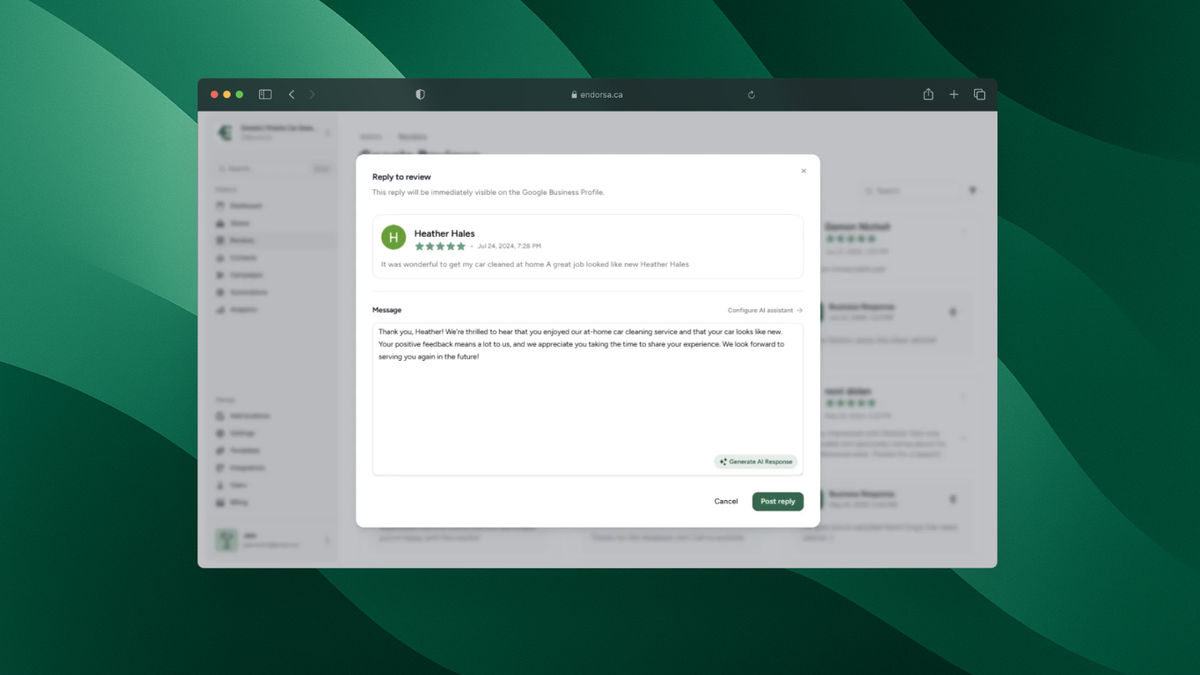
AI-powered review responses that help you reply to every review in your brand's voice
Multi-platform review monitoring so you see and respond to every review from one dashboard
Book a free demo to see how automated SMS review requests work for your business.
Frequently Asked Questions
How do I ask for a Google review via text message?
Send a personalized SMS within hours of the customer's visit that includes their first name, your business name, a reference to the specific service, and a direct Google review link. Keep the message under 160 characters if possible, and always end with a thank you. The templates above give you copy-paste options for every common scenario.
How many SMS review requests should I send per customer?
Send a maximum of two messages per customer: the initial request and one follow-up 3-5 days later if they haven't responded. More than two messages per interaction feels intrusive and risks opt-outs. According to BrightLocal's research, 68% of consumers will leave a review when asked, so the first message often does the job.
Is it legal to send SMS review requests in Canada?
Yes, but you must comply with CASL (Canadian Anti-Spam Legislation). You need prior consent (a completed transaction provides implied consent for two years), your business must be identified in the message, and you must include an opt-out mechanism like "Reply STOP to opt out." Penalties for CASL violations reach up to $10 million.
What is the best time to send a review request text?
The best time depends on your business type. Restaurants should send 1-2 hours after the meal. Dental offices should send 2-3 hours after the appointment. Contractors should send the morning after project completion. The key principle is to send while the experience is still fresh but after the customer has had time to appreciate the result.
Should I ask for a specific star rating in my SMS?
No. Asking for a specific star rating (like "please leave us a 5-star review") violates Google's review policies and can get reviews flagged or removed. Ask for honest feedback instead. Businesses that deliver good service will naturally receive high ratings.
How do SMS review requests compare to email review requests?
SMS has a 98% open rate compared to email's 20%, and most texts are read within 3 minutes. SMS is better for same-day requests after a service or visit. Email works better for detailed follow-ups, premium services, or when you want to include more context. For the best results, use both channels. We have a companion guide on Google review request email templates with 10+ ready-to-use examples.
Start Collecting More Google Reviews Today
SMS review requests are the highest-converting method to collect Google reviews, and the templates in this guide give you everything you need to get started today. Pick the template that matches your scenario, personalize it, and send it within hours of each customer interaction.
For businesses ready to stop sending texts manually, Endorsa automates the entire process: from syncing customer data to sending personalized SMS requests to following up at the right time. Book a free demo and see how automated review requests work for your business.