Google Review Request Email Templates That Work (2026)
10+ proven Google review request email templates with subject lines, timing tips, and industry examples. Copy, paste, and start collecting more reviews today.


Published at:
Updated at:A well-written Google review request email template is the fastest way to turn satisfied customers into 5-star reviews. The right email, sent at the right time, with a direct review link converts at 2 to 3 times the rate of a generic "please leave us a review" message. This guide gives you 10+ copy-paste email templates, proven subject lines, and timing strategies so you can start collecting more Google reviews this week.
Want to skip the manual work entirely? Book a free demo of Endorsa to see how automated review request emails work.
Why Email Is Still the Best Channel for Review Requests
Email remains the highest-converting channel for collecting Google reviews from customers. According to BrightLocal's consumer review survey, 68% of consumers have left a review for a local business when asked, and email is the most common way businesses ask. The combination of personalization, timing control, and direct linking makes email outperform every other request method for most business types.
Channel
Avg Response Rate
Best For
5-15%
Services, B2B, high-value purchases
SMS
10-20%
Retail, restaurants, quick-service
In-person
3-7%
Retail, hospitality
QR Code
1-5%
Physical locations, receipts
According to Spiegel Research Center data, businesses that actively request reviews see conversion rates increase by up to 270% compared to businesses with no review strategy. The volume of reviews matters as much as the star rating.
The key advantage of email is control. You choose the timing, the message, and the customer segment. You can personalize the request based on what the customer bought or experienced, and you can include a direct Google review link that takes them straight to the review form.
The 5 Elements Every Review Request Email Needs
An effective review request email includes five elements that work together to maximize your response rate. Missing any one of these cuts your conversion significantly.
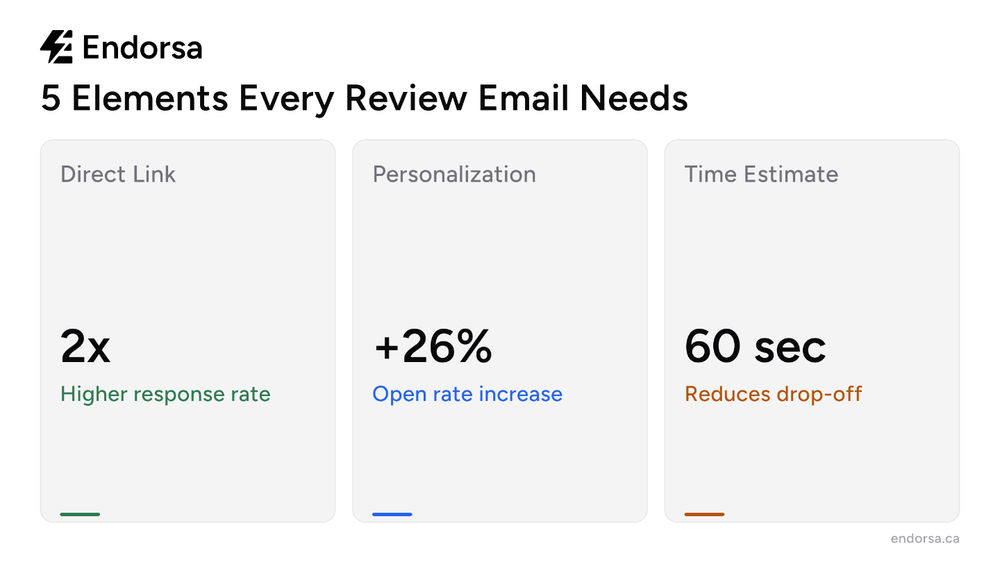
Element
Why It Matters
Example
Personalized greeting
Customers ignore generic emails
"Hi Sarah" not "Dear Valued Customer"
Specific reference
Reminds them of their positive experience
"your kitchen renovation"
Direct Google review link
Removes friction; one click to review
Use your Google review link
Time estimate
Reduces perceived effort
"Takes less than 60 seconds"
Warm sign-off
Keeps the tone personal
Use a real name, not "The Team"
The most important element is the direct link. According to Google's own Business Profile documentation, you can generate a direct review link from your Google Business Profile dashboard. Every extra click between your email and the review form costs you roughly half your respondents.
10 Google Review Request Email Templates (Copy and Paste)
These templates are organized by scenario so you can pick the one that matches your situation. Customize the bracketed fields with your business details.

Template 1: The Standard Post-Service Request
Best for: service businesses, salons, repair shops, consultants
Subject: How was your experience with [Business Name]?
Hi [Customer Name],
Thank you for choosing [Business Name] for your [service type]. We hope everything went well.
If you have 60 seconds, we would love to hear about your experience. Your feedback helps other customers find us and helps us keep improving.
[Leave a Google Review] (link to your Google review page)
Thank you for your support.[Your Name][Business Name]
Template 2: The Quick and Direct Ask
Best for: busy clients, repeat customers, casual relationships
Subject: Quick favor, [Customer Name]?
Hi [Customer Name],
Thanks again for your recent visit. If you had a good experience, would you mind leaving us a quick Google review? It takes less than a minute and helps us more than you know.
[Leave a Review Here]
Appreciate it,[Your Name]
Template 3: The Relationship Builder
Best for: professional services, B2B, consulting, agencies, and real estate agents
Subject: Thank you, [Customer Name]
Hi [Customer Name],
It was a pleasure working with you on [project/service]. I hope you are happy with the results.
As a small business, every review makes a real difference for us. If you have a couple of minutes, I would be grateful if you could share your experience on Google.
[Share Your Experience]
Thank you,[Your Name][Business Name]
Template 4: The Follow-Up After a Compliment
Best for: any business where a customer has already expressed satisfaction verbally
Subject: Glad we could help, [Customer Name]
Hi [Customer Name],
It meant a lot to hear your kind words about [specific compliment]. Feedback like yours keeps our team motivated.
Would you be open to sharing that same feedback as a Google review? It helps other people in [city/area] find us when they need [service type].
[Leave a Google Review]
Thanks again,[Your Name]
Template 5: The Post-Purchase Product Review
Best for: e-commerce, retail, product-based businesses
Subject: How is your [product name] working out?
Hi [Customer Name],
You purchased [product name] from us [timeframe] ago, and we wanted to check in. We hope you are enjoying it.
If you have a moment, a quick Google review about your experience would help other shoppers make confident decisions.
[Share Your Thoughts]
Best,[Your Name][Business Name]
Template 6: The Milestone Celebration
Best for: dental offices, gyms, salons, any recurring service
Subject: [Customer Name], thank you for [milestone]
Hi [Customer Name],
We just realized you have been with us for [timeframe/number of visits]. That means a lot to us.
If you have enjoyed your experience, would you share a quick review on Google? It helps us grow and lets other people know what to expect.
[Leave a Review]
Thank you for your loyalty,[Your Name]
Template 7: The Problem-Resolved Follow-Up
Best for: after resolving a customer complaint or issue
Subject: We hope we made it right, [Customer Name]
Hi [Customer Name],
Thank you for giving us the chance to address [issue]. We take every concern seriously, and we are glad we could resolve it for you.
If you feel we handled things well, we would appreciate a Google review sharing your experience. It helps us show other customers that we stand behind our work.
[Share Your Experience]
Best regards,[Your Name]
Template 8: The Seasonal or Holiday Request
Best for: year-end campaigns, slow periods, anniversary milestones
Subject: A small favor as we wrap up [year/season]
Hi [Customer Name],
As [year/season] wraps up, we are reflecting on the customers who made this year special, and you are one of them.
If you have had a positive experience with us, a quick Google review would be the best way to support our business heading into [next year/season].
[Leave a Review]
Wishing you a great [season],[Your Name][Business Name]
Template 9: The SMS-to-Email Hybrid (Canadian CASL-Compliant)
Best for: Canadian businesses that need CASL compliance on electronic messages
Subject: Quick feedback request from [Business Name]
Hi [Customer Name],
You recently [used our service/visited us/purchased from us], and we hope everything met your expectations.
We are always looking to improve, and your honest feedback on Google would help us and help other customers in [city].
[Leave a Google Review]
You are receiving this email because you provided your contact information during your interaction with [Business Name]. You can unsubscribe from future messages at any time using the link below.
[Your Name][Business Name][Unsubscribe Link]
CASL note for Canadian businesses: Canada's Anti-Spam Legislation requires express or implied consent before sending commercial electronic messages, including review requests. Include your business identity, contact information, and a working unsubscribe mechanism in every review request email. Implied consent from a business transaction expires after two years.
Template 10: The Multi-Location Request
Best for: businesses with multiple locations, franchises
Subject: How was your visit to [Location Name]?
Hi [Customer Name],
Thank you for visiting our [Location Name/City] location. We hope your experience was excellent.
Could you take 60 seconds to share a quick review on Google? Your feedback helps our [Location Name] team and helps other customers nearby find us.
[Review Our [Location Name] Location]
Thank you,[Your Name][Business Name], [Location]
Subject Lines That Get Your Emails Opened
The subject line determines whether your review request gets read or ignored. Mailerlite's email marketing research shows that personalized subject lines increase open rates by 26% compared to generic ones.
Here are proven subject line formulas for review request emails:
Personalized subject lines (highest open rates):
"How was your experience, [Customer Name]?"
"Quick favor, [Customer Name]?"
"[Customer Name], we would love your feedback"
"Thank you, [Customer Name]"
Curiosity-driven subject lines:
"Quick question about your recent visit"
"Can we ask you something?"
"60 seconds to help us out?"
Direct subject lines:
"Would you leave us a Google review?"
"Your feedback matters to [Business Name]"
"How did we do?"
The Gartner Digital Markets review research found that review request emails with a single, clear call to action outperform emails with multiple links or asks. Keep your email focused on one thing: getting the review.
Subject lines to avoid:
"LEAVE US A REVIEW" (aggressive, all caps)
"We need your help!" (sounds desperate)
Anything with "FREE" or excessive punctuation (triggers spam filters)
Subject lines longer than 50 characters (get truncated on mobile)
When to Send Review Request Emails (and When to Follow Up)
Timing directly impacts your response rate. Send the request too early and the customer has not fully experienced your product or service. Send it too late and the emotional connection has faded.
Business Type
Best Send Time
Why
Restaurants
2-4 hours after the meal
Experience is fresh
Service businesses
Same day or next morning
Satisfaction is at its peak
E-commerce / Retail
3-7 days after delivery
Time to use the product
Professional services
1-3 days after completion
They have seen results
Healthcare / Dental
Next business day
Time to recover
Home services
Day of completion
Standing in finished space
Follow-up strategy: If the first email gets no response, send one follow-up 5 to 7 days later. Keep it brief: "Just a friendly reminder, we would still love your feedback if you have a minute. [Review Link]." Do not send more than one follow-up. Multiple follow-ups feel pushy and can damage the customer relationship.
Instead of relying on manual follow-ups, tools like Endorsa can automate your entire review request sequence. Our platform syncs your customer data from Stripe, HubSpot, or QuickBooks and sends personalized review requests at the optimal time for your business type, with automatic follow-ups for non-responders.
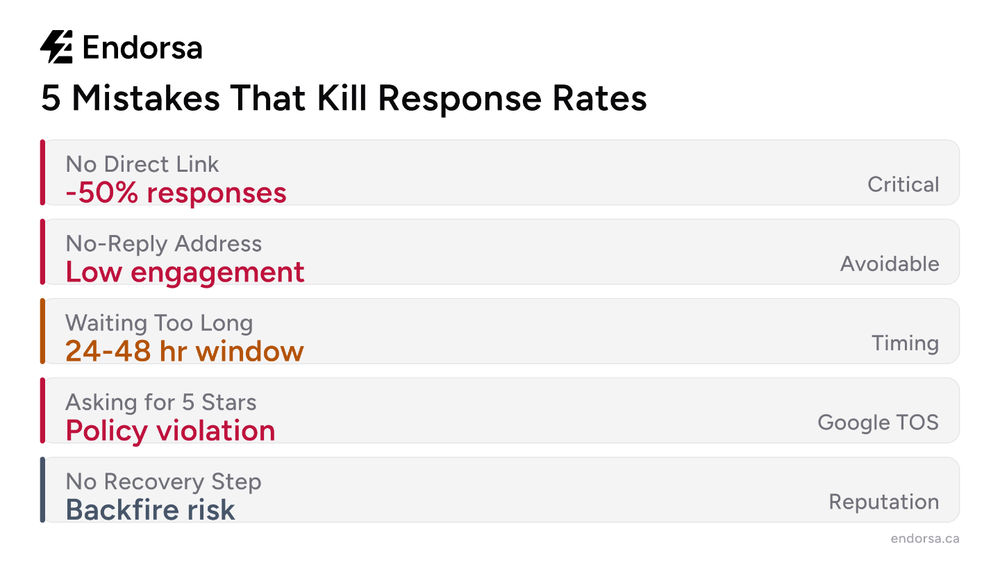
5 Common Mistakes That Kill Your Response Rate
1. No direct review link. Asking customers to "find us on Google" instead of providing a clickable link drops your response rate by more than half. Always include your direct Google review link.
2. Sending from a no-reply address. Emails from "[email protected]" feel impersonal and discourage engagement. Send from a real person's email address whenever possible.
3. Waiting too long to ask. The ideal window is within 24 to 48 hours of the customer's experience. After a week, response rates drop significantly because the emotional connection fades.
4. Asking for a "5-star review." This violates Google's review policies and makes customers uncomfortable. Ask for honest feedback, not a specific star rating.
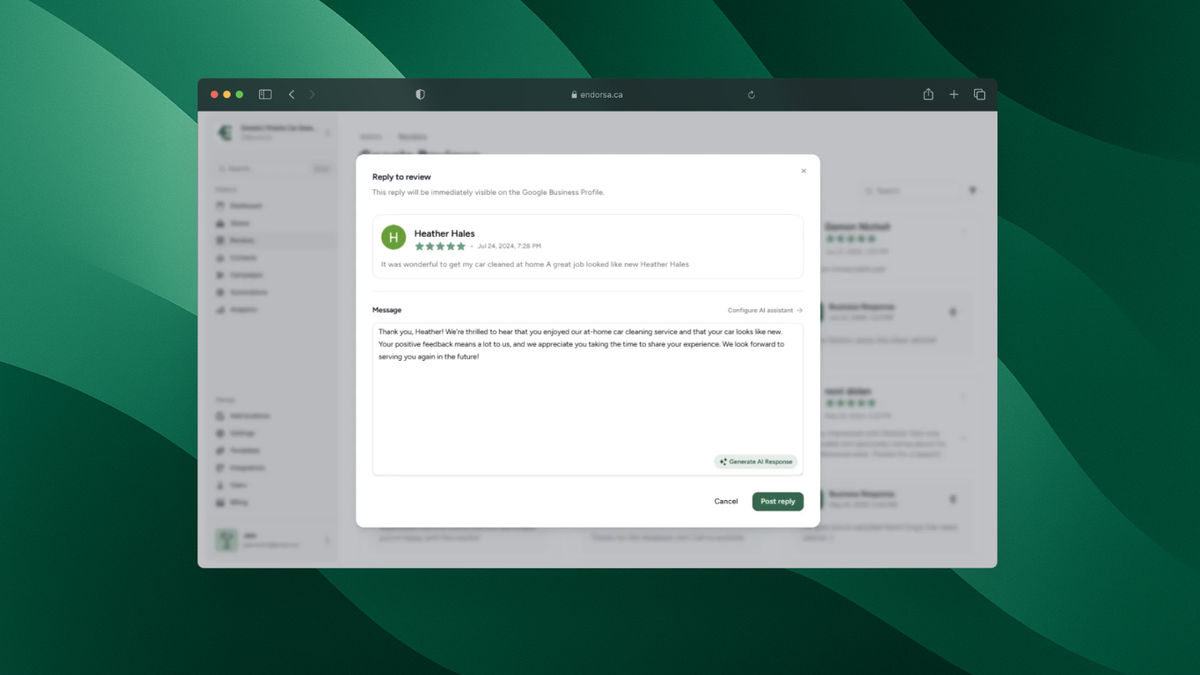
5. Sending to unhappy customers without a recovery step. If a customer had a bad experience, sending a review request can backfire. Use a satisfaction check first: ask how their experience was before directing them to Google. Endorsa's AI review assistant can help you manage any negative reviews that do come through, drafting personalized responses in seconds.
How Endorsa Automates Your Review Request Emails
Sending review request emails manually works when you have five customers a week. When you have fifty, or five hundred, the process breaks down. Templates sit unused, follow-ups get forgotten, and your review count stalls.
Endorsa is a Google review automation platform built in Canada that helps businesses collect, manage, and respond to reviews on autopilot. We built it specifically for business owners who do not have time to manage review campaigns manually.
Here is how it works:
Automatic customer syncing: Connect Stripe, HubSpot, QuickBooks, or use Zapier, and your customer list stays up to date without any manual entry. When a new customer completes a transaction, they enter your review request pipeline automatically.
Personalized email campaigns: Our platform sends customized review request emails using your business name, the customer's name, and details about their purchase or service. Every email includes a direct Google review link.
Smart timing and follow-ups: Set your preferred delay after a transaction, and we handle the rest. Automatic follow-ups go to customers who have not responded, with configurable timing and messaging.
AI-powered review responses: When reviews start coming in, our AI review assistant drafts responses that match your business's tone. You approve and send them in seconds.
CASL compliance built in: For Canadian businesses, our platform includes consent tracking and unsubscribe management so your review request emails comply with Canada's Anti-Spam Legislation.
Stop copying and pasting templates. Book a free demo and see how automated review requests can grow your Google reviews on autopilot.
Frequently Asked Questions
How do you politely ask for a review in an email?
The most effective approach is a short, personalized email that thanks the customer for their business, references their specific experience, and includes a direct Google review link with a time estimate. For example: "If you have 60 seconds, we would love to hear about your experience." Avoid pressure, avoid asking for a specific star rating, and always make it easy to decline.
How do I ask clients to give a Google review?
Send a brief email within 24 to 48 hours of completing your service. Include a personalized greeting, mention what you did for them, and provide a direct link to your Google review page. You can generate this link from your Google Business Profile dashboard. Keep the email under 100 words for the best response rates.
How do I ask for a 5-star review?
You should not ask for a specific star rating. Google's review policies prohibit soliciting reviews with specific ratings, and customers feel manipulated by the request. Instead, ask for honest feedback about their experience. If you consistently deliver great service and ask at the right time, most reviews will be 4 or 5 stars naturally.
How do you ask for a review without being pushy?
Keep your email short, make the ask optional ("if you have a moment"), and never send more than one follow-up. Frame the request around helping other customers rather than helping your business. "Your review helps other people in [city] find reliable [service type]" feels less transactional than "We need more reviews."
What is the best subject line for a review request email?
Personalized subject lines perform best. "[Customer Name], how was your experience?" and "Quick favor, [Customer Name]?" consistently outperform generic alternatives. Keep subject lines under 50 characters so they display fully on mobile devices, and avoid all-caps or excessive punctuation that can trigger spam filters.
Do Google review request emails need to be CASL compliant in Canada?
Yes. Under Canada's Anti-Spam Legislation, review request emails are considered commercial electronic messages. You need express or implied consent before sending, and every email must include your business identity, contact information, and a working unsubscribe mechanism. Implied consent from a business transaction is valid for two years.
Start Getting More Reviews With Better Emails
A good Google review request email template combines personalization, timing, a direct review link, and a clear but low-pressure ask. The 10 templates in this guide cover every common scenario, from post-service follow-ups to multi-location requests. Pick the template that fits your business, customize the brackets, and send it within 24 to 48 hours of your customer's experience.
If you want to automate the entire process, Endorsa handles review request emails, follow-ups, and AI-powered review responses so you can focus on running your business. Book a free demo to see it in action.