Google Review Automation: How to Automate Reviews (2026)
Learn how to automate Google review requests with SMS, email, and QR codes. Step-by-step setup guide with tool selection criteria and CASL compliance tips.

Published at:
Updated at:Google review automation uses software to send review requests, monitor incoming reviews, and generate responses without manual effort. If you are still asking customers for reviews by hand, or worse, not asking at all, automation is the single fastest way to build your online reputation and climb local search rankings.
This guide covers exactly how automation works, the three main methods for automating review requests, how to set it up step by step, and what to look for in a review automation tool. Whether you run a single location or manage multiple storefronts, this is the playbook.
If you want to see automation in action before reading further, book a free demo of Endorsa and we will walk you through it live.
What Is Google Review Automation and Why It Matters in 2026
Google review automation is the process of using software to collect, monitor, and respond to Google reviews without doing each task manually. Instead of remembering to ask every customer for a review, automation handles the timing, delivery, and follow-up for you.
This matters more in 2026 than ever before. Whitespark's annual ranking study confirms that reviews now account for 20% of local pack ranking factors, up from 16% just two years ago. Google's algorithm weighs review quantity, frequency, and recency, which means a steady stream of new reviews outperforms a one-time push every quarter.
The problem is consistency. According to BrightLocal's consumer review survey, 74% of consumers only care about reviews from the last 90 days. Stale reviews signal a stale business. Manual review collection always starts strong and fades within weeks because owners and staff get busy. Automation solves this by making review requests a background process that runs on every transaction, every time.
98% of consumers read online reviews for local businesses, and 74% only trust reviews from the last 90 days. Automation is the only way to keep your review profile fresh without adding hours to your workweek.
Three Methods for Automating Google Review Requests
There are three primary channels for automated review requests: SMS text messages, email campaigns, and QR codes. Each has different strengths depending on your business type and customer base.
Method | Open Rate | Response Rate | Best For | Setup Complexity |
|---|---|---|---|---|
SMS | 90%+ | 15-25% | Service businesses, appointments | Medium |
20-30% | 5-10% | E-commerce, professional services | Low | |
QR Code | Varies | 5-15% | Retail, restaurants, in-person | Low |
SMS Review Requests
SMS is the highest-performing channel for review automation. Text messages reach customers within seconds and have open rates above 90%, compared to 20-30% for email. Most review automation platforms, including Endorsa, let you trigger an SMS review request automatically after a transaction is recorded in your CRM, payment processor, or scheduling tool.
The key is timing. Sending a review request within 1-2 hours of service completion captures the customer while the experience is fresh. Waiting days or weeks drops response rates significantly.
Canadian businesses: If you operate in Canada, your SMS review requests must comply with CASL (Canadian Anti-Spam Legislation). This means you need express or implied consent before sending commercial electronic messages. We designed Endorsa with CASL-compliant SMS review request workflows built in, so Canadian businesses can automate without worrying about compliance violations.
Email Review Requests
Email works well as a secondary channel or for businesses where customers expect email communication (accounting firms, legal practices, B2B services). Open rates are lower than SMS, but email lets you include more context: a thank-you message, a recap of the service, and a direct link to your Google review page.
The best email review requests are short, personalized, and contain a single clear call to action. Include the customer's first name, reference the specific service, and link directly to your Google review page so they can leave a review in two clicks.
QR Codes
QR codes work for in-person interactions where digital follow-up is not practical. Print them on receipts, table tents, business cards, or checkout counters. When scanned, the QR code opens your Google review page directly on the customer's phone.
QR codes are passive, meaning they rely on the customer choosing to scan rather than receiving a prompt. Response rates are lower than SMS or email, but they cost nothing to maintain and work 24/7.

Step 1: Connect Your Customer Data Source
Every automation system starts with your customer list. You need a way for the software to know who to contact and when.
Most businesses already have customer data in a tool they use daily. The goal is to connect that tool to your review automation platform so new customers flow in automatically.
Common data sources include:
Payment processors: Stripe, Square, or QuickBooks record every transaction with customer contact info. When a payment completes, that triggers a review request.
CRMs: HubSpot, Salesforce, or Zoho track customer interactions and lifecycle stages. Trigger review requests when a deal closes or a service is marked complete.
Scheduling tools: Calendly, Acuity, or industry-specific booking software can trigger requests after an appointment ends.
Point-of-sale systems: Toast, Clover, or Shopify POS for retail and restaurant businesses.
We built our platform to sync contacts directly from Stripe, HubSpot, and QuickBooks, plus Zapier for connecting any other tool in your stack. Once connected, new customers enter your review request pipeline automatically.
Step 2: Build Your Review Request Templates
Your review request message is the most important variable in your automation. A generic "please leave us a review" gets ignored. A personalized, well-timed message with a direct link gets results.
Effective review request templates share four elements:
Personalization: Use the customer's first name. Reference the specific service or product.
Brevity: Keep SMS messages under 160 characters. Keep emails under 100 words.
Direct link: Include your Google review link so the customer can leave a review in one tap. No extra steps.
Gratitude: Thank them for their business before asking for anything.
SMS template example:
"Hi [First Name], thanks for choosing [Business Name]! We'd love your feedback. Leave us a quick Google review here: [link]. It takes 30 seconds and means a lot to us."
Email template example:
Subject: How was your experience with [Business Name]?
"Hi [First Name], thank you for choosing us for [service]. If you have a moment, we'd appreciate a quick Google review. It helps other customers find us and helps us keep improving. [Leave a Review button]"
Most automation platforms let you create multiple templates and rotate them so repeat customers do not receive the same message twice. You can customize your SMS review request templates inside Endorsa's dashboard with merge fields that auto-populate customer names and service details.

Step 3: Set Your Automation Triggers and Timing
The trigger defines when a review request gets sent. The timing defines how long after the trigger event the message goes out.
Trigger options by business type:
Business Type | Best Trigger | Timing |
|---|---|---|
Service businesses | Job completion or payment | 1-2 hours after |
Restaurants | End of meal or receipt | Same day, early evening |
Healthcare/Dental | Appointment completion | Next morning |
E-commerce | Delivery confirmation | 2-3 days after delivery |
Professional services | Project milestone or invoice | Within 24 hours |
Timing best practices:
Send within 24 hours of the experience for most businesses. The Spiegel Research Center research on review solicitation shows that immediacy drives response rates.
Avoid sending during off-hours (before 8 AM or after 9 PM in the customer's time zone).
For services with a "wow moment" (like seeing a finished renovation or receiving test results), time the request to land right after that moment.
Send one follow-up to non-responders after 3-5 days. More than two total messages risks annoying the customer.
Step 4: Set Up Automated Review Monitoring and Responses
Automation is not only about collecting reviews. You also need to monitor incoming reviews and respond to them promptly.
According to ReviewTrackers' research, 53% of customers expect a business to respond to their review within 7 days. Businesses that respond to reviews earn 35% more revenue on average than those that ignore them.
Automated review monitoring alerts you the moment a new review appears on your Google Business Profile. This alone saves time because you are not manually checking your profile every day.
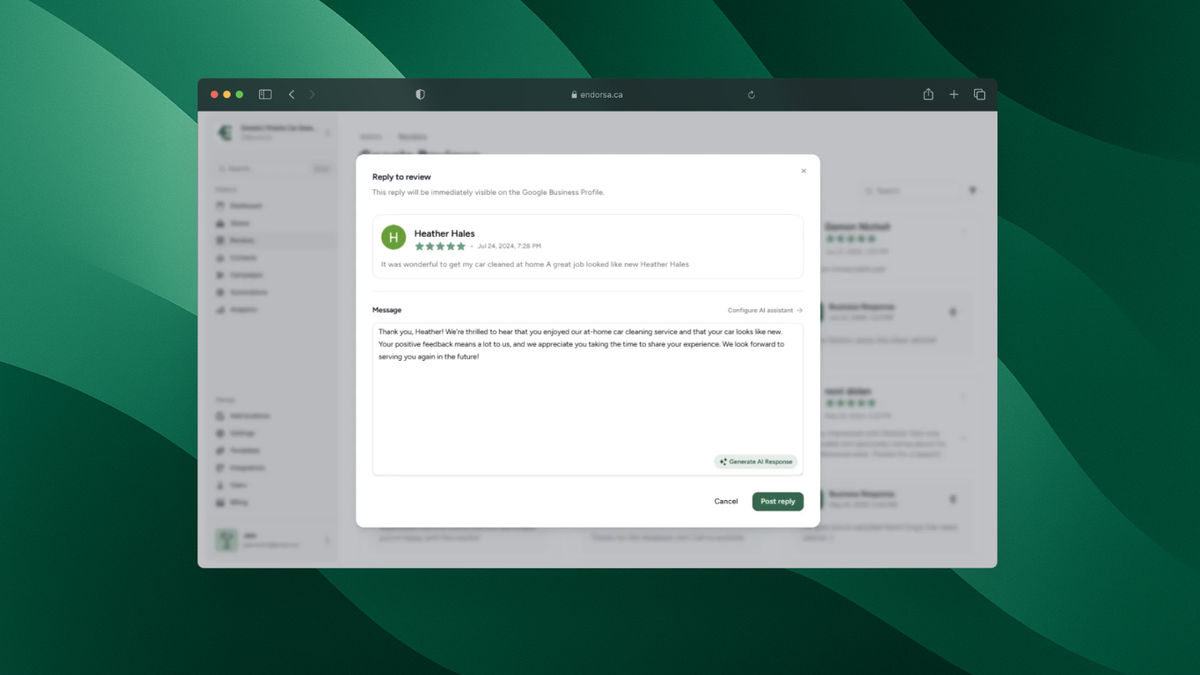
For responses, AI-powered tools can draft reply suggestions that match your business's tone. You review the draft, make any edits, and send it in seconds rather than spending 10-20 minutes composing each response from scratch. Our AI review response tool generates personalized replies for every review, whether it is a glowing five-star testimonial or a frustrated one-star complaint.
Businesses that respond to just 25% of their reviews see a 4.1% improvement in conversion rates. Responding to all of them, consistently and quickly, compounds that advantage over time.
Step 5: Measure and Optimize Your Results
Automation without measurement is just activity. Track these metrics monthly to confirm your automation is working and identify areas for improvement.
Key metrics to track:
Review request delivery rate: What percentage of requests actually reach the customer? Low delivery rates indicate bad contact data or spam filter issues.
Review conversion rate: What percentage of delivered requests result in a completed review? Industry benchmarks range from 5-15% for email and 15-25% for SMS.
Average star rating: Is your rating improving, stable, or declining? A declining rating with increasing volume means you have a service problem, not a marketing problem.
Review velocity: How many new reviews are you getting per week or month? Consistent velocity matters more than spikes.
Response time: How quickly are you responding to new reviews? Aim for under 24 hours.
Most review automation platforms include a dashboard for tracking these metrics. Review your numbers monthly and adjust your templates, timing, or trigger points based on what the data shows.
Common Mistakes with Google Review Automation
Sending too many requests. One request plus one follow-up is the maximum. Bombarding customers with review requests damages your relationship and can trigger spam complaints.
Using the same template forever. Rotate your templates every 60-90 days. Freshness in messaging keeps response rates from declining.
Ignoring negative reviews. Automation handles the collection side, but negative reviews still need a human touch. Never let an AI response go out on a one-star review without your personal review first. Use AI drafts as a starting point, not the final word.
Not segmenting by experience quality. Some platforms let you route customers through a satisfaction check before sending them to Google. If a customer indicates a poor experience, you can redirect them to a private feedback form instead. This is not about hiding negative reviews; it is about giving unhappy customers a private channel to resolve issues before they go public.
Skipping compliance. In Canada, CASL governs commercial electronic messages including review requests via SMS and email. In the US, TCPA applies to text messages. Make sure your automation platform handles consent and opt-out compliance. We built CASL compliance directly into our workflows because we are a Canadian company and know firsthand how important this is.

How Endorsa Automates Your Entire Review Pipeline
We built Endorsa to handle every step described in this guide, from contact syncing to review collection to AI-powered responses, without requiring any technical setup.
Here is how it works in practice. You connect your payment processor, CRM, or scheduling tool (we support Stripe, HubSpot, QuickBooks, and Zapier). When a new customer transaction completes, Endorsa automatically sends a personalized review request via SMS or email using templates you have customized. If they do not respond, a single follow-up goes out on your preferred schedule.
When reviews come in, our AI review assistant drafts responses that match your business's tone. You approve them with one click. For multi-location businesses, our dashboard consolidates every location's reviews into one view so you are not juggling separate accounts.
Endorsa is a Google review automation platform built in Canada that helps businesses collect, manage, and respond to reviews on autopilot. We designed it for small-to-mid-size businesses that want more Google reviews without adding another task to their plate.
Book a free demo to see the full platform in action. Setup takes under 15 minutes.
Frequently Asked Questions
What are automated Google reviews?
Automated Google reviews refer to the process of using software to request, collect, and manage Google reviews without manual effort. The reviews themselves are real and written by real customers; the automation handles the asking, not the writing. Businesses connect their customer data source (CRM, payment processor, scheduling tool) to an automation platform, which then sends review requests via SMS, email, or both at the right moment after each transaction.
How do you automate Google review requests?
You automate Google review requests by connecting your customer data source to a review automation platform, creating personalized request templates, and setting triggers that send requests after each transaction or appointment. The platform handles delivery, timing, and follow-up. Most businesses can set up automated review requests in under 30 minutes with a tool like Endorsa that integrates directly with Stripe, HubSpot, and QuickBooks.
Is it against Google's policies to automate review requests?
No. Google explicitly encourages businesses to ask customers for reviews. What Google prohibits is incentivizing reviews (offering discounts or rewards in exchange), gating reviews (only asking satisfied customers), and posting fake reviews. Automated review requests that go to all customers without incentives comply fully with Google's review policies.
How many Google reviews do you need to rank in the local pack?
The number varies by industry and market, but BrightLocal's research indicates that businesses in the top three of the local pack have an average of 47 reviews. More important than a specific number is review velocity: a steady stream of recent reviews signals to Google that your business is active and relevant. Automation ensures that velocity stays consistent regardless of how busy your team is.
What is the best time to send a Google review request?
Send review requests within 1-2 hours of service completion for service businesses, and within 24 hours for most other business types. The experience is freshest in the customer's mind immediately after interaction, which increases the likelihood of a detailed, positive review. Avoid sending requests before 8 AM or after 9 PM in the customer's time zone.
Start Automating Your Google Reviews Today
Google review automation is the difference between businesses that consistently grow their online reputation and those that stagnate with a handful of stale reviews. The setup takes less than an hour, and the compound effect of steady review collection builds over months into a significant competitive advantage in local search.
We built Endorsa specifically for this: simple, affordable Google review automation that works for businesses of any size. Start collecting reviews today with a free demo and see results within your first week.